

Smart Design uses AI to automatically generate optimized PV layouts based on project goals. Instead of placing modules manually, you can create layouts in a few clicks and refine them using configurable design parameters.
Open Smart Design
Go to the Modules step and click Smart Design in the toolbar.
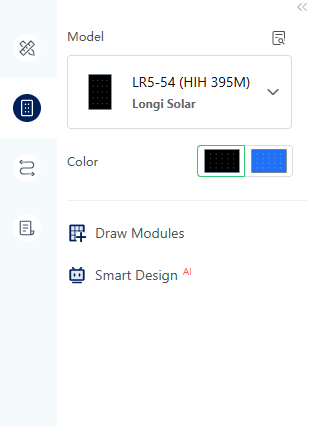
If modules are already placed on the roof, a confirmation message appears before generating a new layout.
Smart Design is unavailable until a module model is selected.
Choose a Design Mode
Select one of the three modes at the top of the panel.
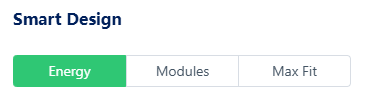
By Energy Production
Enter a target annual energy yield.
The system estimates required module quantity and generates a layout based on local solar resources and module specifications.

By Module Quantity
Enter the desired number of modules.
The system places modules within the available roof area based on the specified quantity.

Fill Roof
Automatically fills the roof with modules based on available installation space.
This mode is useful for quickly understanding the maximum system capacity of a roof.
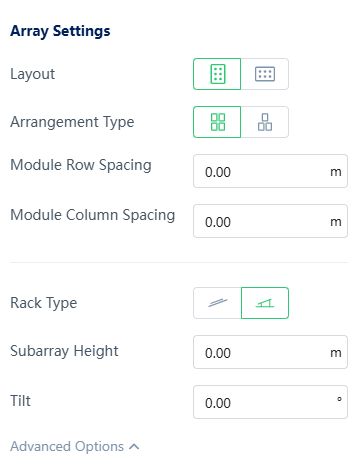
Configure Array Settings
Array settings define how modules are arranged in the generated layout.
Basic settings:
- Module orientation
- Layout type
- Row spacing
- Column spacing
Advanced settings:
- Mounting type
- Array height
- Tilt angle
Generate and Refine Layouts
Click Run Smarter to generate a layout.
After generation, you can:
- Click Run Again to test different configurations
- Compare layout results
- Review module count and system capacity
- Click Confirm to apply the design
The layout is previewed directly on the canvas during calculation.
Terrain-Aware Layouts
For projects with terrain elevation enabled, Smart Design automatically adjusts layouts to match ground conditions.
Module height and tilt are adapted based on terrain, ensuring the layout follows the natural surface of the site.
Tips for Better Results
- Adjust array settings before generating layouts
- Use Fill Roof to evaluate maximum capacity
- Use By Energy Production for energy-target-driven design
- Use By Module Quantity for fixed module count projects
- Run multiple iterations before confirming the final layout