

Navigation
To access this page, look at the left sidebar menu:
- Click on Settings.
- Select Design from the expanded dropdown menu.
- The Design settings page allows users to configure global default parameters and engineering preferences for solar projects. This ensures consistency and speeds up the layout and electrical planning process.
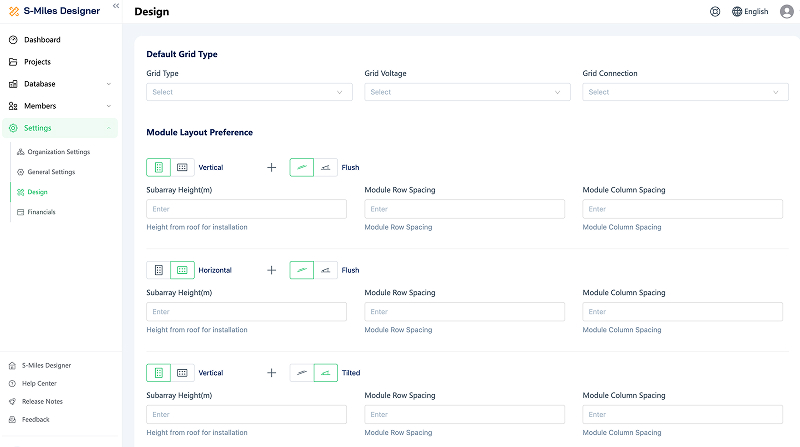
The configuration parameters are divided into four main sections:
a. Default Grid Type
Sets the baseline electrical grid specifications for the project.
- Grid Type: Defines the phase or standard configuration of the power grid.
- Grid Voltage: Sets the standard operating voltage of the connected grid.
- Grid Connection: Configures the specific grid tie-in or coupling type.
b. Module Layout Preference
Defines how solar panels are physically arranged and spaced during the 3D or 2D design phase.
- Orientation & Mount: Sets defaults for panel orientation (e.g., Vertical) and mounting style (e.g., Flush).
- Subarray Height (m): Specifies the physical installation height of the panels above the roof surface.
- Module Row / Column Spacing: Defines the default clearance distances between individual solar panels or rows to account for walkways or shading.
c. Module Preference
Establishes the default hardware manufacturer and visual style for the project.
- Manufacturer & Model: Pre-selects a preferred solar panel brand (e.g., Jinko Solar) and specific model number.
- Color: Sets the visual color preference for the modules used during the layout design.
d. Electrical Design Preference
Controls the engineering logic and constraints for the electrical system configuration.
- Allow Cross-Roof Stringing: Toggles whether modules on different roof faces can be wired together into the same microinverter or inverter.
- Allow Device Mixing: Determines whether different models of microinverters or inverters can be used within a single design.
- Target DC/AC Oversizing (%): Defines the target ratio of the total DC solar module capacity to the total AC inverter output power.